

Our HR AI assistant has officially landed with our first customers. But before it got there, it was being used by the people who know our HR software best: our own.
Our people team uses and relies on our AI HR software every day. They're also our sharpest critics – if something's clunky, they'll tell us. So when the assistant became available internally, we paid close attention to how they used it and what changed as a result.
A few months in, the answer is: quite a lot. From chasing data gaps to prepping for meetings, the assistant has quietly become part of how the team works.
Here are some of the ways they're using it right now.
How to use AI in HR
1. Spotting double-booked holiday in seconds
One of the first unexpected wins came from a simple personal query. Our learning and development business partner Zoë Bloomfield asked the assistant to check whether she had any duplicate holiday booked during the current holiday year – and it found two days she'd accidentally double-booked.
"It identified two days on which I'd double-booked leave,” she says. “I was able to cancel the duplicate and get an accurate holiday balance back. Previously I would have had to manually go through my absence calendar to try and spot duplicates."
A small thing on the surface, but a useful example of the kind of admin the assistant quietly absorbs – the sort of check you wouldn't bother running manually, but that's worth doing when it only takes seconds.
2. Faster, more accurate employee data at point of need
For our people relations manager Eliseo Pithey-Street, the assistant has become the fastest route to the detail she needs – particularly when continuous service dates matter.
If she's discussing an employee relations issue and needs to know whether someone has hit two years' service, she asks the assistant directly. The same principle applies to maternity calculations, where pinpoint accuracy on service dates is essential.
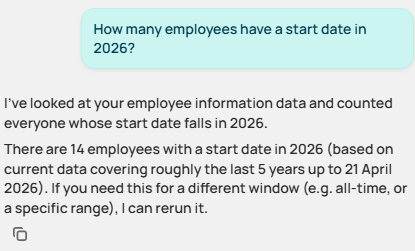
Above: the AI assistant answers data-based questions that HR admins would otherwise need to run a report to answer
"Calculating maternity entitlements requires pinpoint accuracy on continuous service dates. Using AI to pull this instantly means I can provide employees with their support plans and pay schedules immediately – improving the employee experience during a major life milestone," she says.
It's also changing how she approaches absence management. Rather than waiting for patterns to surface in monthly reports, Pithey-Street can check absence data at any time – and spot trends early. "It can help me shift from a reactive stance to a proactive wellbeing partner – and makes reporting much easier too."
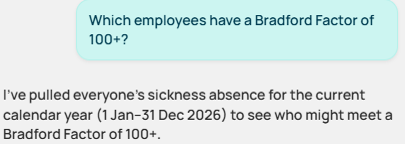
Above: easily get the answers to absence management questions using the AI assistant
3. Data at a glance – and the confidence to ask more questions
Our talent success lead Sophie Hellmuth points to pace as the biggest change. She can now bring real data into conversations the moment they happen, without pausing to run a report.
"In a meeting, I can give data at a glance,” she says. “I don't have to go and run reports to find information – I have it there and then, so decisions can be made so much quicker."
She also uses it for quick data quality checks – the kind of task that typically falls to people teams and typically gets deprioritised. Who has missing data? Who hasn't acknowledged the latest policy? Who hasn't uploaded a profile picture? All of it surfaces instantly, so she can nudge the right people directly and spot patterns as they emerge.
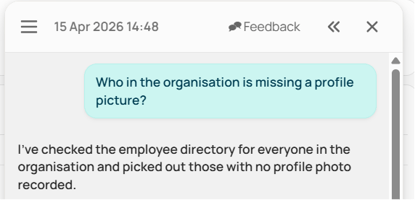
Above: no need for manual checks or reports - the AI assistant does the hard work for you
Some of the most interesting use cases, though, aren't obviously about saving time. Sophie Hellmuth uses the assistant for summary questions that would ordinarily require a report, filtering, and a calculation – things like 'what was the total amount of referral payments we made last year?' The answer comes back in under 10 seconds.
But the bigger shift is what happens next.
"It's not just the time it takes to find the answer – it's then thinking broader. Now I know it's so quick and easy to get this information, I have no blockers to exploring data."
That's the change we see repeatedly: when friction disappears, curiosity goes up. Questions get asked that wouldn't have been asked before – and the people team starts using its data more strategically as a result.
Small wins, compounding effect
None of the examples above are revolutionary on their own. A holiday check here, a service date lookup there, a report that used to take 10 minutes and now takes 10 seconds. But stack them up across a team, across a week, across a year – and the picture shifts and the way they’re using AI in HR adds up to something bigger.
What our people team describes isn't just time saved. It's a different way of working. Questions get asked that wouldn't have been asked before. Data gets checked more often because checking is no longer a project in itself. And the team spends more of its week on the conversations and decisions that actually need a person in the room.
For more examples of how to get the most from our HR AI assistant, read our Top 10 prompts to try with Ciphr's HR AI assistant.
Want to see what it could do for your team?
Every HR team has its own version of the tasks described above – the recurring checks, the ad-hoc data pulls, the questions that keep landing in HR's inbox. If you'd like to see how our AI HR software handles those in practice, we'd be glad to show you.
Book a demo for a live walkthrough, or download our AI factsheet for a closer look at how the assistant is operates, and the guardrails in place to make sure that users only see the data they’re allowed to view.